

It’s becoming increasingly common to spend long hours glued to a computer screen.
Whether it’s for work, study, or leisure activities, we rely heavily on our computers to get things done. However, all that time spent staring at a screen can take a toll on our health and wellbeing if we don’t adopt good working habits.
From eye strain to back pain, the risks associated with prolonged computer use are real and can lead to serious health problems over time.
That’s why it’s essential to establish good working habits when using a computer.
By taking the time to set up a comfortable workspace, taking frequent breaks, maintaining good posture, and avoiding distractions, you can help reduce the risks of developing health problems associated with long hours in front of a computer.
In this blog post, we’ll explore some essential tips for developing good working habits when using a computer.
Whether you’re a student, a professional, or someone who spends a lot of time on a computer, this post is for you!
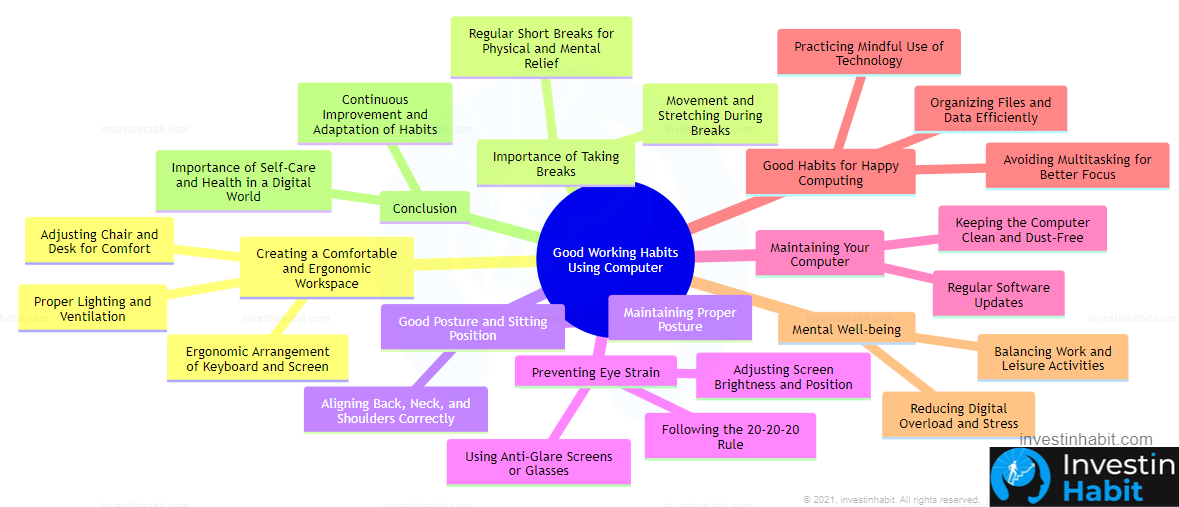
Inside this Article
Why Good Working Habits with Computers Matter
Good working habits when using a computer are crucial for several reasons.
Firstly, adopting good working habits can help prevent physical health problems such as eye strain, back pain, and carpal tunnel syndrome. Secondly, good working habits can boost productivity and reduce the risk of burnout.
Taking regular breaks, for example, can help you stay focused and avoid mental fatigue, while maintaining good posture can increase energy levels and reduce stress on your body. Thirdly, developing good working habits can also help you maintain a healthy work-life balance.
By establishing a routine that allows for regular breaks, exercise, and relaxation, you can avoid the trap of working long hours and neglecting your personal life. Finally, developing good working habits is essential for long-term career success.
Employers are increasingly looking for employees who can work efficiently and effectively, and demonstrating good working habits is a great way to show that you are a valuable asset to the team.

Transform Your Life with InvestInHabit

Ready for real change? Join us and get over:
- 200+ Personal Development Worksheets,
- 100+ Blog Post MindMaps
for FREE! 😍 + Our newsletter offers the latest in habit formation and self-improvement, straight to your inbox.
Subscribe now and Start redefining your mindset today! Join our community committed to success!
Tips for a Comfortable and Ergonomic Workspace
Creating a comfortable work environment can make a huge difference in how you feel throughout the day.
Firstly, let’s talk about the importance of a comfortable work environment.
When you’re comfortable, you’re less likely to experience physical pain or fatigue. This means you can work for longer periods of time without feeling drained or exhausted.
So, make sure your workspace is set up in a way that feels good to you. This could mean adjusting your chair height, adding a cushion for lumbar support, or setting up your desk in a way that allows you to sit in a comfortable position.
Next up, ergonomic considerations.
Ergonomics is all about creating a workspace that fits your body and how it moves. You want to make sure your computer screen is at the right height and distance to avoid eye strain, and your keyboard is positioned in a way that doesn’t put too much strain on your wrists.
An adjustable keyboard tray or a standing desk might be helpful solutions to consider as well.
Finally, let’s talk about proper lighting and ventilation.
Poor lighting can lead to eye strain, headaches, and even depression. So, make sure you have adequate lighting in your workspace, but try to avoid harsh overhead lighting.
Natural light is always a great option if you can get it. And when it comes to ventilation, you want to make sure you’re breathing in clean air.
Open a window if possible or invest in an air purifier to keep the air in your workspace fresh and clean.
By setting up a comfortable workspace with ergonomic considerations, proper lighting, and ventilation, you’re creating an environment that will help you work more comfortably and efficiently.
Remember, taking care of yourself is always worth it in the long run.
Importance of Taking Breaks and Moving Around When Using a Computer
Are you guilty of sitting in front of your computer for hours without taking a break?
It’s easy to get caught up in your work, but taking regular breaks is crucial for your health and productivity. In this section, we’ll talk about the importance of taking breaks, how often and how long you should take them, and some tips for moving around during your breaks.
Boost Your Productivity and Health
Taking breaks is essential for avoiding burnout and staying focused.
It’s easy to lose track of time when you’re working on a task, but taking a break can actually help you work more efficiently. It gives your brain a chance to rest and recharge, so you can come back to your work with renewed energy and focus.
So, how often and how long should you take breaks?
Experts recommend taking a 5-10 minute break every hour, or a 15-20 minute break every 2 hours. Use this time to get up and move around, stretch, or take a short walk.
You could also use this time to meditate or practice deep breathing exercises to help reduce stress.
Moving around during your breaks is also important for maintaining good health.
Sitting for long periods of time can lead to aches and pains, and even increase your risk of developing certain health problems. So, use your break time to get up and move your body.
Take a quick walk around your office or do some simple stretches at your desk. You could also try doing some yoga poses or going for a quick jog outside.
Remember, taking breaks is not a waste of time. It’s actually an investment in your health and productivity. So, make sure to take breaks regularly, move your body, and come back to your work feeling refreshed and energized.
The Importance of Good Posture and Proper Sitting Position When Using a Computer
Did you know that maintaining good posture is essential for your health when using a computer?
Poor posture can lead to aches and pains in your neck, shoulders, and back, and even cause more serious health problems over time. In this section, we’ll talk about the importance of good posture, how to sit properly when using a computer, and some exercises you can do to improve your posture.
Good posture is not just about looking confident and standing up straight.
It’s also about keeping your body in alignment, so you can avoid pain and injury. When you’re using a computer, it’s important to maintain good posture to avoid strain on your neck, shoulders, and back.
This means keeping your shoulders relaxed, your back straight, and your feet flat on the floor.
To sit properly when using a computer, start by adjusting your chair so your feet are flat on the floor and your knees are level with your hips.
Keep your back straight, and avoid leaning forward or hunching over your keyboard. Make sure your computer screen is at eye level, so you don’t have to strain your neck to see it.
Straighten Up!
In addition to sitting properly, there are also some exercises you can do to improve your posture.
Simple stretches like shoulder rolls and chest openers can help relieve tension and improve your posture over time. You could also try doing some yoga or Pilates exercises to improve your core strength and flexibility.
Remember, good posture is essential for your health and wellbeing when using a computer.
By sitting properly and doing some exercises to improve your posture, you can avoid pain and injury and improve your overall quality of life. So, sit up straight, take a deep breath, and let’s get to work!
Prevent Eye Strain: Tips for Computer Users
Do you ever experience eye strain after spending a long time in front of your computer?
Eye strain is a common problem when using a computer, but there are things you can do to reduce the risk. In this section, we’ll talk about the causes of eye strain, tips for reducing it, and some recommended computer settings to help you avoid eye strain.
Causes of eye strain when using a computer can include glare from the screen, focusing too long on a single distance, and not blinking enough. Eye strain can cause headaches, blurred vision, and even neck and shoulder pain.
To reduce eye strain, try adjusting the lighting in your workspace.
Avoid glare from windows or overhead lights and reduce the brightness of your computer screen. Also, make sure to take frequent breaks to rest your eyes.
Look away from your screen every 20 minutes and focus on an object in the distance for at least 20 seconds. Blinking more often can also help keep your eyes moist and reduce dryness and irritation.
In addition to adjusting your environment and taking breaks, you can also adjust your computer settings to help reduce eye strain.
Try increasing the font size to make it easier to read and adjust the contrast settings to make text easier on the eyes. Also, consider investing in a pair of computer glasses with an anti-reflective coating to reduce glare and protect your eyes.
Remember, taking care of your eyes is important when using a computer.
By reducing eye strain through adjusting your environment, taking breaks, and adjusting your computer settings, you can protect your eyes and avoid discomfort. So, take care of your eyes and they will take care of you!
Maintain Your Computer: Tips for Regular Care
When was the last time you took care of your computer?
It’s easy to forget about maintaining your computer, but it’s an essential part of keeping it running smoothly and avoiding potential problems. In this section, we’ll talk about the importance of maintaining your computer, regular software updates, and how to clean your computer.
Maintaining your computer is important for several reasons.
First of all, it can help extend the lifespan of your computer and prevent hardware failures. Second, regular maintenance can help keep your computer running smoothly, which can boost productivity and reduce frustration.
Finally, maintaining your computer can also help improve security by preventing malware and other security threats.
Regular software updates are an important part of maintaining your computer.
These updates can include bug fixes, security patches, and new features that can help improve your computer’s performance. Make sure to install updates as soon as they become available to avoid potential problems down the road.
Cleaning your computer is also an essential part of maintenance.
Over time, dust and debris can accumulate inside your computer, which can cause it to overheat and slow down. Make sure to clean the inside of your computer regularly, using compressed air or a soft brush to remove dust and debris.
Also, make sure to wipe down your keyboard, mouse, and screen with a soft cloth to keep them clean and free of fingerprints.
By taking care of your computer through regular maintenance, software updates, and cleaning, you can help extend its lifespan and keep it running smoothly.
So, make sure to give your computer the care and attention it deserves, and it will thank you in return!
Good Habits for Happy Computing: A Recap of Essential Tips and Final Thoughts
In conclusion, developing good working habits when using a computer is essential for your health, productivity, and overall wellbeing.
By setting up a comfortable workspace, taking breaks and moving around, maintaining good posture, avoiding eye strain, and maintaining your computer, you can improve your work experience and avoid potential problems down the road.
Remember, taking care of yourself is always worth it in the long run. By adopting good working habits when using a computer, you can reduce the risk of physical health problems, improve your productivity and focus, and maintain a healthy work-life balance.
So, take a deep breath, stretch your arms, and start implementing some of these tips into your work routine. You’ll be amazed at the positive impact they can have on your work and your life.
Transform Your Habits, Transform Your Life
Are you ready to turn the page to a new chapter in your life?
Stop dreaming, start achieving. Our exclusive newsletter delivers:
- Science-backed hacks: Master the psychology of habit formation used by CEOs and Olympians.
- Actionable strategies: No fluff, just practical steps to crush procrastination and dominate your goals.
- + a FREE surprise bonus 🎁 to jumpstart your transformation!
Don’t settle for mediocre. Subscribe now!